


















Table of Contents
Related Products
$0.50 Original price was: $0.50.$0.10Current price is: $0.10.
In Stock
$0.50 Original price was: $0.50.$0.10Current price is: $0.10.
In Stock
$0.50 Original price was: $0.50.$0.10Current price is: $0.10.
In Stock
$0.50 Original price was: $0.50.$0.10Current price is: $0.10.
In Stock
Get A Free Quote
Start with the products when choosing display box dimensions. Measure them and decide how many the display will hold. Then check the available retail space. The finished box needs room for that arrangement, with enough clearance to load products and take them out.
Looks can be misleading. Folded walls and dividers take up space inside, as does the material itself. Products or a raised back panel may also extend above the sides, changing the display’s full height.
This display box size guide covers measuring and comparing sizes, then working out capacity. Every example dimension is illustrative. None represents a universal standard.
What Are Display Box Dimensions?
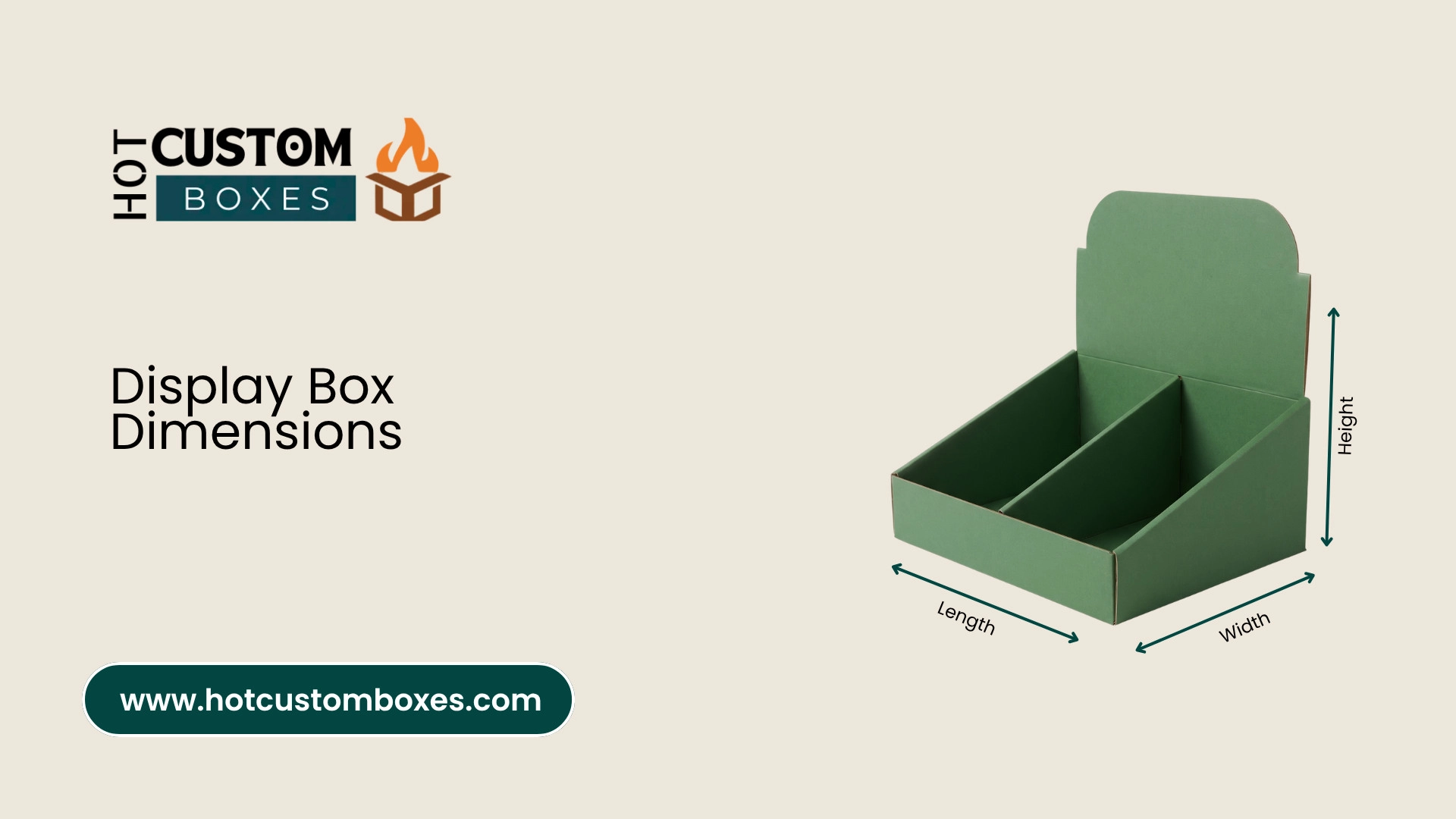
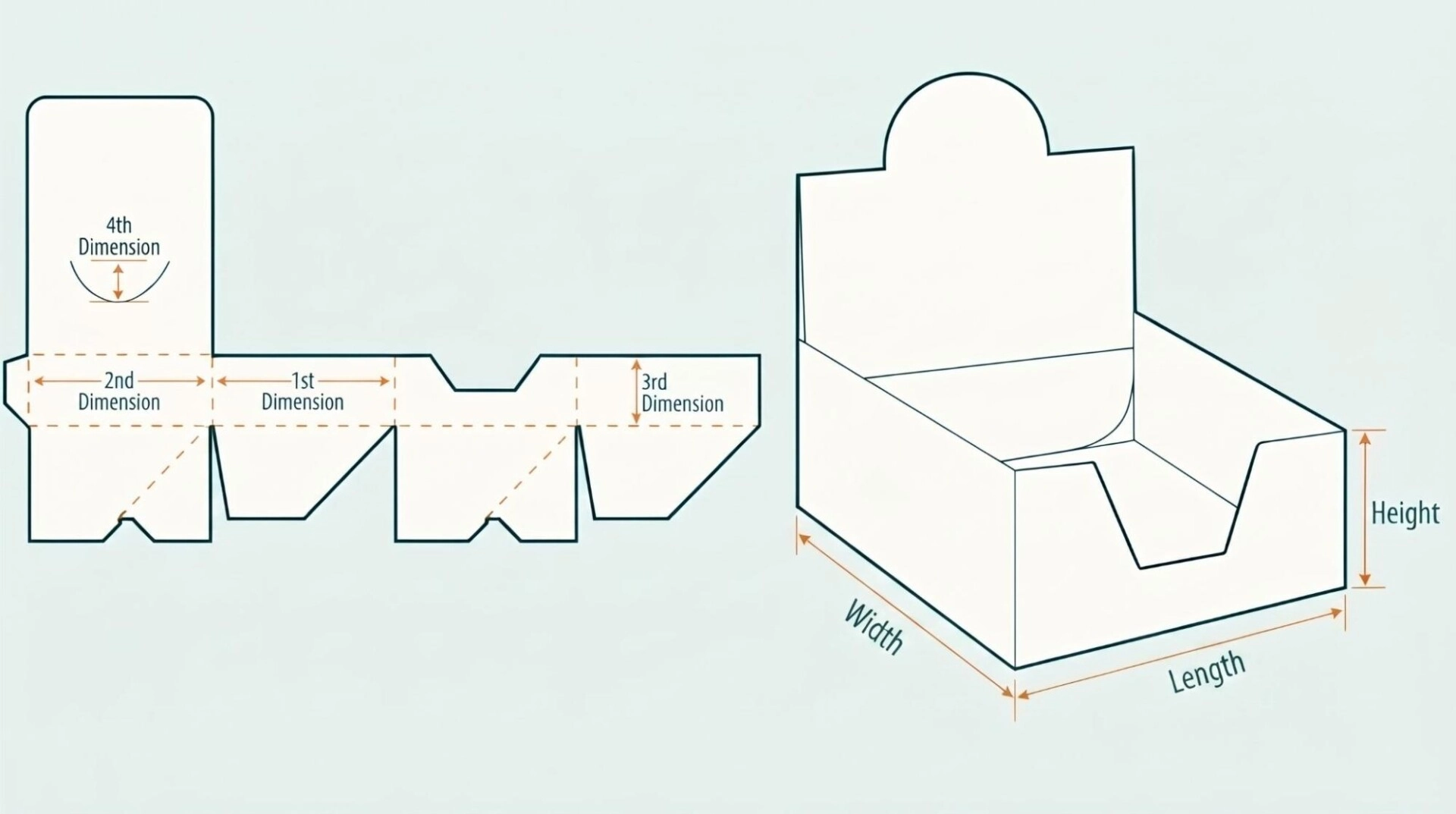
Display box dimensions give the assembled box’s length and width, plus its height. They describe the base size and vertical measurements.
In this guide:
- Length means the longer side of the base.
- Width means the shorter side.
- Height runs vertically from the base to a stated top edge.
Retail specifications sometimes use width × depth × height instead. Width usually means across the front in that format. Depth runs from front to back. Check the order before comparing boxes or placing your order.
An open display doesn’t always have one panel height. Its front might stand 2 inches high, with 3-inch sides and a 7-inch back. Those measurements refer to separate parts of the box.
Internal vs. External Dimensions
Use internal dimensions to check product fit. They describe the usable space inside and help determine how many units the box holds.
External dimensions tell you how much space the assembled display takes up. Use them to check its fit on a counter or shelf, including an allocated floor area.
A 12 × 8-inch external base, for example, gives you less than 12 × 8 inches inside. Walls and folds use some of that room. If your product arrangement needs the full 12 × 8 inches, the box must be larger externally.
Standard Display Box Dimensions
There are no universal standard display box dimensions. The product and its arrangement affect the size. So do the display structure and retailer’s requirements.
Small, medium and large are broad descriptions. One supplier’s measurements may differ from another’s.
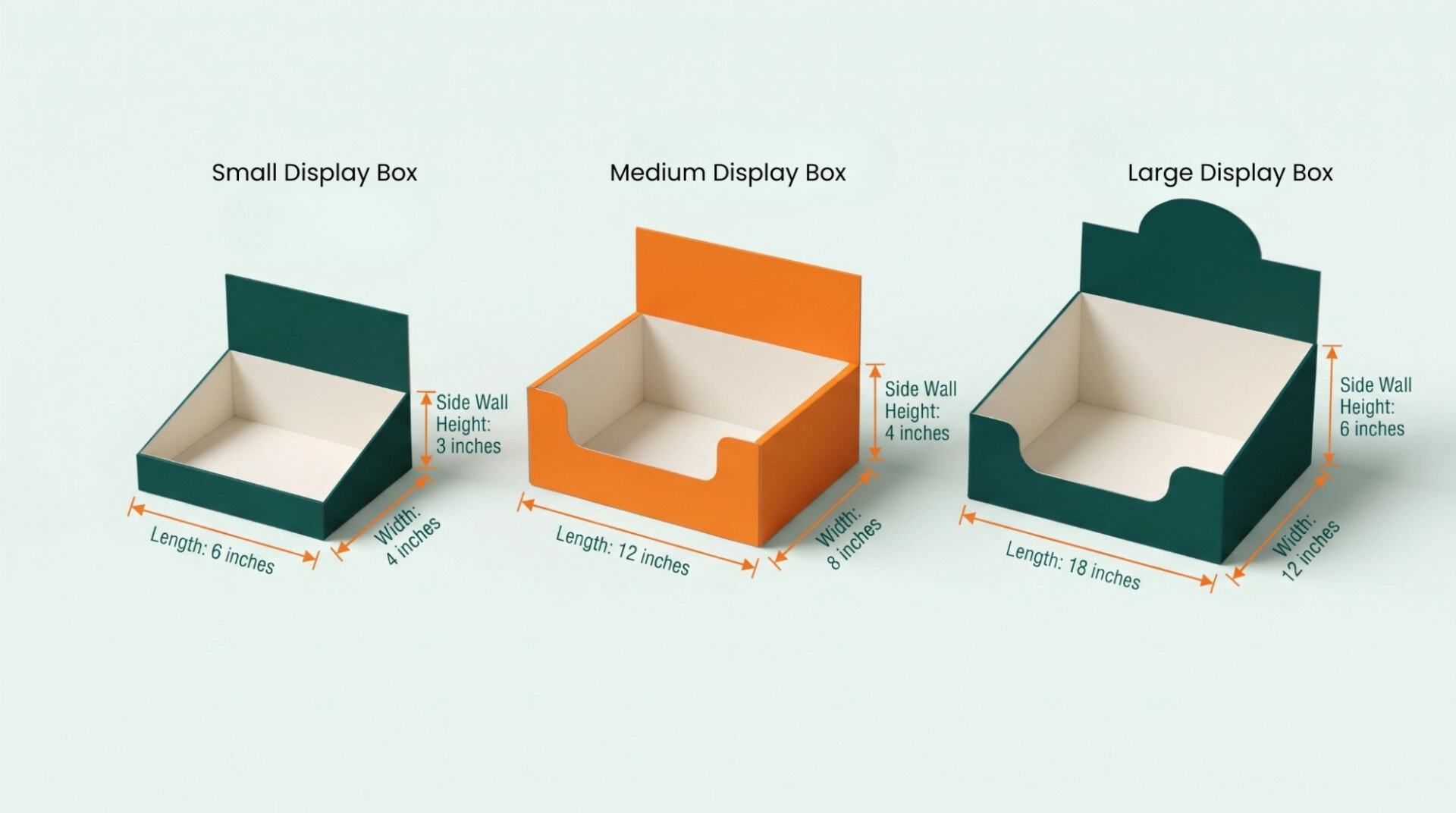
The table below gives illustrative internal dimensions for open countertop displays or trays. Height means the side wall here. Measure a taller back panel separately.
| Illustrative Size | Length | Width | Side Wall Height | Possible Applications |
|---|---|---|---|---|
| Small | 6 inches | 4 inches | 3 inches | Lip balms or small packets, including compact accessories |
| Medium | 12 inches | 8 inches | 4 inches | Snack bars or cosmetic cartons, including stationery |
| Large | 18 inches | 12 inches | 6 inches | Larger pouches or boxed accessories, including grouped products |
These footprints give you a comparison, not a capacity guarantee. Several narrow packets might fit a 12 × 8-inch base. Wide cartons may leave room for only a few.
Base cardboard display box sizes on the actual products. Ask whether the supplier’s measurements include projecting tabs or headers, along with other parts of the assembled display.
How to Measure Display Box Dimensions
Assemble the box fully before measuring it. Use a tape measure or ruler. Write down the measurement order so there’s no confusion later.
Measure Length, Width and Height
- Measure the length: Run the measurement along the longer base side.
Measure the width: Take it along the shorter side.
Measure the height: Go vertically from the base to the stated top edge. Record the front, side and back panel heights separately if they differ.
An open display might measure 10 × 6 inches internally at the base, with a 2-inch front and a 6-inch back. Writing only “10 × 6 × 2 inches” misses the taller panel.
Check the Usable Interior
Take internal measurements between the inside surfaces. Folded corners or inserts can narrow the space, as can sloping walls. Check the tightest points.
For external measurements, use the assembled structure’s outermost points. Count anything that affects where the display can sit.
Only have a flat blank? Ask for assembled dimensions. The flat measurements won’t directly tell you the usable interior or finished footprint.
Use Consistent Units
Product display box measurements can appear in inches or centimeters. Millimeters are used too.
- 1 inch = 2.54 centimeters
- 1 inch = 25.4 millimeters
- 1 centimeter = 10 millimeters
So 10 inches equals 254 millimeters. Keep every product measurement and gap in the same unit as the box dimensions throughout your calculations.
Display Box Dimensions by Type
Each display format calls for different checks. Measure the product space inside, then check the full assembled size.
Countertop Display Boxes
Countertop display box dimensions depend on the available footprint and product arrangement. The full height matters too.
Measure the counter space first. Look for equipment nearby and restrictions above it.
Example: Each of six cosmetic cartons measures 2 inches across and 1.5 inches deep, with a height of 4 inches. A layout of three across and two rows deep takes up 6 × 3 inches before clearance.
An illustrative internal base of 6.5 × 3.5 inches adds space for loading and gaps. Test the actual cartons in it, particularly when dividers form part of the design.
Record a floor display’s full width and depth, then its height. Each shelf needs separate usable measurements and a vertical opening measurement.
Example: A three-shelf floor display has a 16 × 10-inch internal base on each shelf. Products with a 3 × 4-inch footprint could sit five across and two rows deep.
Before gaps or dividers, that layout uses 15 × 8 inches. The preliminary capacity is 10 products on each shelf. Across three shelves, that’s 30 products.
But check the opening above each shelf separately. A 6-inch-tall product needs room to go in and come back out.
Display Trays
The base area and wall heights guide display tray dimensions. Internal compartments also affect the space available.
Measure the widest part of each product. On a jar or bottle, the lid may be wider than the base.
Example: Eight jars, each with a maximum outside diameter of 2 inches, occupy 8 × 4 inches in a four-across, two-deep arrangement. That’s before clearance.
An illustrative internal tray measuring 8.5 × 4.5 inches gives the arrangement extra room. Allow separately for dividers if you’re using them.
Shelf-Ready Display Boxes
Shelf-ready packaging dimensions need to accommodate the stock and fit the retailer’s shelf opening.
Check external width and depth, plus the loaded height. If staff remove a lid or tear-away section, record the closed size and display size.
Example: A shelf has 14 inches of available width and 10 inches of usable depth. Its vertical opening is 9 inches. A display measuring 13.5 inches wide by 9.5 inches deep fits the base area.
If the products or back panel stand 8 inches high, there’s only 1 inch left above. Try removing products within that opening to check customer access.
How to Choose the Right Display Box Dimensions
Measure the finished products first. Plan the quantity and arrangement next, then compare the proposed display with the retail space. For more guidance, read how to choose the right display boxes for your business
Measure Products in Their Final Packaging
Count caps and seals in your measurements. Include hanging tabs or anything else that protrudes. Pouches need measuring when filled.
Position the product as it will sit in the display. Standing it upright can use a different footprint from laying it flat.
Where finished sizes vary slightly, measure several units. Plan around the largest relevant measurements.
Plan the Quantity and Arrangement
Decide the unit count before sketching the layout. Mark out the rows and columns.
Twelve cartons, for example, can sit four across and three rows deep. Turn that into three across and four rows deep, and the quantity stays the same. The footprint changes.
Choose the layout that fits the available shelf frontage and depth.
Allow Clearance and Product Spacing
Products need room beside the walls and between one another. Inserts take up space too, so include them and any divider thickness.
No single clearance allowance works for every product. Flexible packs behave differently from rigid cartons. Irregular items have their own fit requirements.
Use a sample to check loading and removal. Items shouldn’t catch or become tightly wedged.
Check Available Shelf or Counter Space
Check retail fit using external dimensions. Measure the area you can actually use rather than the furniture’s full size.
Brackets or shelf lips can reduce that space. Neighbouring displays may do the same. Check the loaded product height and any raised back panel too.
Leave room to place the display and lift it back out. Don’t size it to match the opening exactly.
Choose a Suitable Front Panel Height
A front panel needs to contain the stock without making access awkward.
Example: Put a 5-inch carton behind a 4-inch panel and just 1 inch remains exposed. Customers may struggle to grasp it.
Lower that panel to 2 inches and 3 inches remain exposed. Still, the lower wall must contain the product adequately for its shape and resting position.
Try the height with a loaded sample. Tall or top-heavy products may need inserts or dividers for extra support.
How to Calculate Display Box Size and Capacity
Use the available internal space to work out display box capacity. Product orientation matters, along with the gaps required.
Simply dividing box volume by product volume usually gives too high a count. It leaves out empty spaces and product shape. It also ignores how the items need to face.
For rectangular products arranged in one layer:
- Required internal length = total product lengths + gaps between products + clearance at both ends
- Required internal width = total row widths + gaps between rows + clearance at both sides
- Calculate divider thickness separately.
Practical Size Calculation
Say the display needs to hold 12 upright cartons. Each measures:
- 2.5 inches long
- 1.5 inches wide
- 5 inches tall
Place four along the box length, with three rows across the width.
In this example, leave 0.125 inch between neighbouring cartons. Allow 0.25 inch at each outer edge. These are illustrative allowances. Check them with a physical sample.
Internal length:
(4 × 2.5) + (3 × 0.125) + (2 × 0.25)
= 10.875 inches
Internal width:
(3 × 1.5) + (2 × 0.125) + (2 × 0.25)
= 5.25 inches
That gives a required internal base of 10.875 × 5.25 inches before inserts or further fitting allowances.
The single-layer capacity is:
4 × 3 = 12 cartons
Although the cartons stand 5 inches tall, an open display can have lower walls. Record the loaded height separately, including a taller back panel where present.
Check Product Orientation
Turn the products and the count may change.
Take a 10 × 8-inch internal base and products with a 3 × 2-inch footprint. Before clearance, two simple grid layouts are possible:
- Three along the length and four along the width: 12 products
- Five along the length and two along the width: 10 products
The first arrangement fills the entire 8-inch width. There’s no allowance beside the walls or between rows. Unless the box gets larger, its practical capacity may be lower.
Account for Material Thickness
With cardboard and corrugated cardboard, material sits between the internal and external surfaces. That reduces the usable interior.
On a simple straight-sided box, the external base measurement is roughly the internal measurement plus both wall thicknesses. Folded walls can increase the difference. Overlapping panels and reinforced corners can do so too.
Confirm the finished external footprint against the supplier’s assembled specifications.
Common Mistakes When Choosing Display Box Dimensions
Measuring Empty or Unfinished Packaging
Filled pouches may take up more room than empty ones. A hanging tab or carton closure can also project beyond the main pack.
Measure the finished product in the position it will occupy in the display.
Confusing Internal and External Measurements
Internal dimensions won’t give you the full shelf footprint. External dimensions won’t tell you product capacity.
Mark both clearly on the drawings and specifications.
Ignoring Gaps and Dividers
A calculation may show that products fit, yet leave them difficult to load or remove.
Before finalising the size, allow for spacing between products and beside walls. Include divider thickness too.
Overlooking Shelf Restrictions
A display can fit across a shelf but project over its front edge. A back panel might fit below the shelf above yet leave too little product access.
Test the complete loaded display in the intended space.
Selecting the Wrong Front Panel Height
A high front panel can hide the stock or make it hard to reach. Too low, and it may not contain the products adequately.
Check with actual products. An empty box won’t show the same problems.
Get the Right Display Box Dimensions for Your Products
Choose display box dimensions that fit your products, support easy access, and make the best use of your retail space. Hot Custom Boxes offers custom display boxes in sizes and styles suited to your product arrangement, shelf requirements, and branding needs. Share your product measurements and quantity to get a display box designed around your packaging requirements.
Frequently Asked Questions
There are no universal standard display box dimensions. Product and quantity affect the measurements, as do display type and retail space.
Always check the actual sizes behind supplier descriptions such as small, medium and large.
Measure length and width on the assembled box, then its height. State the measurement order and label dimensions as internal or external.
If front, side or back panels differ in height, record each separately.
Internal dimensions tell you the usable product space. External dimensions give the full space occupied by the box.
Material thickness and folds create differences between them. Structural features affect that difference too.
Allow for gaps and dividers, then count how many products fit along the usable internal length and width. Multiply those counts for one layer.
Count extra layers only when both the display and products are designed for stacking.
Measure the shelf’s usable width and depth, plus its vertical opening. Choose external dimensions that stay within those limits.
Then check internal capacity and loaded height. Customers also need enough clearance to remove products.
Related Products
$0.50 Original price was: $0.50.$0.10Current price is: $0.10.
In Stock
$0.50 Original price was: $0.50.$0.10Current price is: $0.10.
In Stock
$0.50 Original price was: $0.50.$0.10Current price is: $0.10.
In Stock
$0.50 Original price was: $0.50.$0.10Current price is: $0.10.
In Stock